

Find Useful SSD Savings for Your Setup
Upgrade storage for less with SSD deals covering everyday PCs, laptops and faster NVMe setups.





Today on Sunday November 8 2026, we found 50 offers across 6 stores featuring SSD
We may earn affiliate commissions.
SSD Deals

Explore Origin Storage Inception SSD 512GB MSATA 3D TLC SSD at GamingKit
GamingKit offer: StarTech 4-Bay HDD/SSD Duplicator & Sanitiser Dock
Explore Origin Storage SSD 3840GB 3.5in SATA RI 1DWPD in Hot Swap Caddy at GamingKit
Explore Origin Storage SSD 3.84TB 3.5in SATA RI 1DWPD in Hot Swap Caddy at GamingKit
Explore Origin Storage SSD 1920GB 2.5in SATA RI 1DWPD in Hot Swap Caddy at GamingKit
Explore 2-Power 256GB SSD 2.5 SATA 6Gbps 7mm at GamingKit
Explore 2-Power 128GB SSD 2.5 SATA 6Gbps 7mm at GamingKit
Explore Origin Storage SSD 3840GB 2.5in SATA RI 1DWPD in Hot Swap Caddy at GamingKit
Explore Origin Storage SSD 960GB 3.5in SATA RI 1DWPD in Hot Swap Caddy at GamingKit
Explore Origin Storage SSD 960GB 2.5in SATA MWL 3DWPD in Hot Swap Caddy at GamingKit
Explore Origin Storage SSD 1920GB 3.5in SATA RI 1DWPD in Hot Swap Caddy at GamingKit
Explore Origin Storage SSD 960GB 2.5in SATA RI 1DWPD in Hot Swap Caddy at GamingKit
Explore Origin Storage SSD 960GB 3.5in SATA MWL 3DWPD in Hot Swap Caddy at GamingKit
Explore Origin Storage 3840GB Hot Plug Enterprise SSD 3.5in SATA Read Intensive at GamingKit
Explore Origin Storage SSD 1.92TB 3.5in SATA RI 1DWPD in Hot Swap Caddy at GamingKit
Explore Origin Storage SSD 1TB 2.5in SATA 3D TLC in 3.5in Converter incl cables at GamingKit
Explore Hypertec FirestormLite 480GB M.2 2280 SATA SSD; 520MB/s read 470MB/s write at GamingKit
Explore Hypertec FirestormLite 240GB 2.5 7mm SATA 6Gbps SSD at GamingKit
Explore Hypertec FirestormLite 480GB 2.5 7mm SATA 6Gbps SSD at GamingKit
Explore StarTech.com Single Bay Hard Drive Eraser. Standalone HDD/SSD Sanitizer. USB 3.0 to SATA II (3 Gbps). 9 Erase Modes. LCD Display. Secure Erase Hard Disk Sanitizer Dock. DB-9 Printer Port. TAA Compliant at GamingKit
Explore StarTech.com Dual-Bay USB 3.2 Gen 2 to SATA Hard Drive Docking Station. USB 10Gbps Hard Drive Dock. External 2.5/3.5 SATA I/II/III SSD/HDD Docking Station. Hot-Swap Hard Drive Bay. Top-Loading at GamingKit
Explore StarTech.com Single Bay USB 3.1 to SATA Hard Drive Docking Station. USB 3.1 (10 Gbps) Hard Drive Dock. External 2.5/3.5 SATA III HDD/SSD Docking Station. Top-Loading Hard Drive Bay at GamingKit
Explore Origin Storage Inception SSD 256GB M.2 SATA 3D TLC 80mm at GamingKit
Explore Origin Storage SSD 250GB 2.5in SATA 3D TLC with HPE Isolation Grommets at GamingKit
Explore StarTech.com M.2 SSD Enclosure for M.2 SATA SSDs - USB 3.0 (5Gbps) with UASP - TAA at GamingKit
How to save more on SSDs
Compare price per gigabyte as well as the headline saving. A 2TB NVMe SSD can offer better value than buying two smaller drives, while a cheaper 500GB model may make more sense for a secondary drive or modest upgrade.
Check the interface and physical format before buying. M.2 does not automatically mean NVMe, and PCIe generations can affect compatibility and performance. For U.2 or specialist drives, make sure your system has the required connector or use a compatible adapter.
Look beyond the drive price for the real cost. Delivery charges, discount codes and bundle offers can change the final total, while an unusually cheap SSD may have lower endurance, an unfamiliar controller or limited warranty coverage. For laptops and desktops already containing an SSD, also check whether there is a free slot before purchasing.
Understanding SSD deals and options
SSD savings can be useful at several points in a PC upgrade cycle. Faster storage can reduce loading times and improve general responsiveness, while additional capacity helps when a laptop, desktop or compact PC is running short of space. Current offers can cover standalone drives as well as complete computers that include SSD storage.
The products in this selection span several types of SSD use. M.2 NVMe drives are common choices for modern desktops and laptops, with capacities ranging from compact 128GB or 256GB models through 500GB and 1TB drives to 2TB options. PCIe 4.0 models can offer substantially higher sequential speeds than older PCIe generations, although actual performance depends on the host system and workload.
Some SSD-related offers are aimed at specialist installations rather than straightforward upgrades. U.2 drives and PCIe adapters can be relevant for compatible workstations or systems with specific storage requirements, while an SSD cooler can help manage temperatures in demanding setups. Always check motherboard support, available slots, dimensions and interface requirements before ordering.
SSD-equipped laptops, desktops, mini PCs and refurbished business machines also appear in this type of deal selection. Here, the SSD is part of a complete system rather than a component bought separately, so compare the storage capacity alongside RAM, processor, condition and upgradeability. This makes it easier to judge whether a lower-priced computer genuinely suits the way you intend to use it.
SSD offers ended
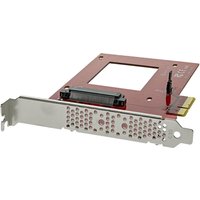
Currys Deal: Enjoy 48 % Off Startech U.2 to PCIe Adapter for NVMe SSD

Apple macbook air 15 - m4 chip, 10-core cpu & gpu, 16gb ram, 256gb ssd – now £999
Apple macbook pro 16 m3 pro, 12-core, 18gb ram, 512gb ssd - £1,499!
Apple iMac 24” - M4 Chip, 8-Core, 16GB, 256GB SSD - Pink - Now £1,050!
Apple mac mini m2 - 8-core cpu, 10-core gpu, 8gb ram, 256gb ssd - £449!
Apple macbook pro 14 m3 max, 14-core, 30-core gpu, 36gb ram, 1tb ssd - £1,899
Frequently asked questions
What should I check before buying an SSD?
Check the storage interface, physical size, capacity and compatibility with your computer. For M.2 drives, confirm whether your system supports NVMe and which PCIe generations it can use.
Is a larger SSD always better value?
Not necessarily. Larger drives often have a lower cost per gigabyte, but paying for capacity you will not use may not be worthwhile. Compare the total price and your expected storage needs.
Are PCIe 4.0 SSDs compatible with older systems?
Compatibility depends on the motherboard or laptop. A newer PCIe SSD may work in some older PCIe slots at the supported speed, but you should check the system specifications before buying.
Should I buy an SSD for a laptop or desktop?
It depends on whether the existing system has an upgradeable storage slot and how much space you need. Complete laptops and desktops with SSDs can also be considered when replacing an older machine.
What does an SSD cooler do?
An SSD cooler helps transfer heat away from a compatible drive. It can be useful for demanding workloads, but check that there is enough clearance inside the computer before fitting one.
Whether you need more capacity, a faster boot drive or a complete SSD-equipped system, comparing the specifications can reveal useful savings. Browse the current offers below to find an option that fits your setup and budget.
Back to offers & codes ↑


